Modules / Module 7
Module 07
Display and the book
What a book demands of a display tool, and what the tool decides in return.
- ~110 min
- requires modules 1 and 2
- intermediate
- IIIF viewers, storytelling tools, CollectionBuilder
- CC BY 4.0
The research question
I want to put a book online so people can read it. Which viewer do I use, and what will it do to the book?
The second half of the question decides the first. Every display tool carries assumptions about what a book is, made by people who mostly had a different kind of book in mind. You inherit those assumptions when you choose the tool.
This module works in three moves: state what the object requires, test each tool against that list, then build something and record what the tool decided.
The Japanese material
Most viewers were designed for codices read left to right, in which the page is the unit and the image sits inside a text block.
An early modern Japanese illustrated book meets almost none of that. It reads right to left, its images routinely run across the gutter so that the opening is the composed surface, it comes in multi-volume sets that are one work, and its text and image share the same sheet.
What this book demands
Six conditions, stated before any tool is opened. They are the list a viewer gets held against.
01Direction: the book reads right to left
Including the direction of paging, the position of the first leaf, and which way an arrow should point. If the manifest does not state the direction, the viewer uses its default: left to right.
02Opening: the opening is the unit
Designs are composed across the opening, the two facing pages. In pouch binding (fukurotoji) each leaf is one sheet folded at the fore-edge, so the two halves of an opening come from two different sheets, joined at the gutter. A viewer that shows single pages splits the composition.
03Surface: text and image share it
There is no separate caption zone to put a transcription in, and treating the text as metadata about the image mistakes what the sheet is doing.
04Dispersal: one book, many copies
A printed book exists in multiple originals, and its copies and editions are dispersed across institutions and their databases. Each holder describes its copy differently, and the records do not always agree.
05Sets: several volumes are one work
Three volumes catalogued as three items are three items in most systems, and one book on the shelf. Sets are not always complete, nor always identified as sets by the repositories that hold them.
06Titles: one book, several names
The title on the cover slip, the one at the head of the text and the one in a catalogue can all differ, and a volume may have been recorded under any of them.
Before you start — Find the book and its Manifest
Find your book in at least two repositories and record, for each, what it says: the title in the record and the title on the book, where the date comes from, which volumes are held, and the address of the IIIF Manifest. Then open the book in each repository's own viewer and note what it does well and where it goes wrong.
The Manifest address usually ends in manifest.json. Look for the IIIF logo (a small square of coloured bars) or a link reading “IIIF Manifest” near the image, right-click it and copy the link. If a viewer is already running on the page, the address is in its information panel. The address must start with https, and if one viewer shows nothing, try a second before deciding it is wrong.
The disagreements between records are the first finding of this module.
Where to look: eighteen repositories
| Repository | IIIF | Good for, and what to watch |
|---|---|---|
| Kokusho (NIJL) | Some | Finding a book when you do not have the right title. Start here when a title search fails elsewhere. |
| NDL Digital Collections | Yes | Wide coverage. Check whether a record is an Edo original or a later facsimile. Some items are restricted to users in Japan or at partner institutions. |
| NDL Search | No | Bibliographic records, separate from the Digital Collections. Good for secondary information. |
| Waseda Kotenseki | Some | Deep holdings and good images. Not every record has a Manifest. |
| Pulverer Collection | No | The fullest English-language records for Japanese illustrated books, cover to cover, in a custom page-turner. |
| Smithsonian collections | Yes | Manifest on the object page. Rights vary by unit: Libraries material is often CC0, the Freer Pulverer books carry conditions. For a multi-volume book, the Manifest may describe one image or several pages. |
| British Museum | Some | Provenance detail. Image licensing is separate from the record. Few Manifests. |
| Metropolitan Museum | Yes | Open Access images, freely reusable, with Manifests. |
| MFA Boston | Some | Large Japanese holdings, often under copyright. |
| Victoria and Albert Museum | Some | Object-level records. Manifests at iiif.vam.ac.uk/collections/{accession}/manifest.json. |
| Japan Search | n/a | Searches several institutions at once. It does not merge their records, so one book can appear twice. A good starting point. |
| Cultural Japan | Some | Cross-institution search, and one of the fastest ways to find a Manifest. |
| ColBase | Some | Japan's four national museums and the research institutes. |
| ukiyo-e.org | n/a | Reverse image search. More prints than books, and some links are out of date. |
| ARC, Ritsumeikan | Some | Federated search across ARC and partner collections. The Early Japanese Books database shows Manifest buttons where the holder provides them. |
| Kyoto University | Yes | Around 26,000 titles, with a Manifest for every item. |
| Penn Digital Collections | Yes | Full books in high resolution, with notes stating where a date came from. Includes the Tress Collection. |
| Finding Manifests | n/a | Step-by-step guidance for over 100 institutions. Check here first when you cannot find an address. |
Eight books to practise on
Each is widely held and makes one problem easy to see.
| Book | What it makes you notice | Where to start |
|---|---|---|
| Hokusai manga 北斎漫画 Katsushika Hokusai, 1814–1878 | Titles, dates and volume counts differ from place to place, and Meiji reprints are often catalogued as Edo originals. | Kokusho, then NDL, then any museum |
| Ehon mushi erabi 画本虫撰 Kitagawa Utamaro, 1788 | Colour matters, and each repository renders it differently. Poems and images share one surface, so a viewer that treats the page as only picture or only text loses part of the meaning. | British Museum, Pulverer, NDL, Waseda |
| Ehon seirō bijin awase 絵本青楼美人合 Suzuki Harunobu, 1770 | Five volumes in full colour, verse and portrait interleaved. Tests whether a viewer can hold a set together as one work. | Smithsonian |
| Fugaku hyakkei 富嶽百景 Katsushika Hokusai, 1834–35 | Reprinted for decades from worn blocks, so copies differ visibly. Good for comparing two impressions side by side. | NDL, Waseda, Met, MFA Boston |
| Miyako meisho zue 都名所図会 Takehara Shunchōsai, 1780 | Landscape views composed across the opening. A single-page viewer cuts every one in half. | NDL, Waseda, ARC |
| Shiohi no tsuto 潮干のつと Kitagawa Utamaro, c. 1789 | Embossing, metallic pigment and blind printing, which flat digitisation records poorly. | Pulverer, British Museum, MFA |
| Onna daigaku takarabako 女大学宝箱 various, 1716 onward | One title, many editions decades apart, often catalogued with dates that belong to a different edition. | Kokusho first, then NDL and Waseda |
| Wakan sansai zue 和漢三才図会 Terajima Ryōan, 1712 | An encyclopedia in 105 volumes. Shows what a display tool does with an object too large for it. | NDL, Waseda |
What to record for each repository
- The title in the record, copied exactly, and the title printed on the book (cover slip, daisen, or first page). Any variant titles.
- The date, and where it comes from: colophon (okuzuke), preface, cataloguer's estimate, or not stated.
- The artist as the record names them, and any signature in the book.
- How many volumes the book has, and which ones this repository holds.
- The Manifest address, or “none found”.
- Image quality (can you zoom to individual lines?) and what the record says about reuse.
- Where you got stuck: the exact search terms, and what happened.
- Where the record and the book disagree.
- For the repository as a whole: what it does well, what is weak, and what appears only in the Manifest or only on the record page.
Step 1 — Ask what the manifest already asserts
Two fields in a IIIF manifest carry most of what a viewer needs in order to get conditions 1 and 2 right: viewingDirection and behavior (viewingHint in version 2). Open the Manifest and look for them. They are frequently absent.
The computational operation
viewingDirection takes one of four values and tells a viewer which way the sequence runs. right-to-left is the one this material needs.
The behaviour field says how to group: paged for a book shown as openings, continuous for a scroll, individuals for unrelated sheets. Individual canvases can be marked non-paged, which is how covers and colour targets are kept out of the pairing.
Where these are absent a viewer applies its own defaults, which are almost always left to right and single pages. The viewer shows no error, and the book appears backwards.
The commonest finding is a missing viewingDirection. The institution has published the book without saying which way it reads, so every viewer guesses, and guesses left to right.
A stated value has limits too. Declaring paged asks a viewer to pair leaves, but leaves the choice of pairs to the viewer. One extra image near the front, such as a cover or a title slip, shifts every opening after it. A single unmarked sheet is enough to break condition 2.
Three more fields deserve the same scrutiny. metadata carries artist, date and format, which look settled once they travel with the image: check them against the book. items lists the pages, and a library holding volumes 2 and 5 of fifteen may list just those two, which a viewer then joins as if consecutive. rights says what may be reproduced. In version 2 Manifests, items is called sequences and behavior is viewingHint.
Step 2 — Place the tools on two axes
Tools change every year. Two questions stay the same, and every display tool answers both.
Who decides the order?
At one end the author decides: a sequence is composed, and the reader follows it. At the other the reader decides: everything is available, and the arrangement offers several routes.
Both ends are arguments. A composed sequence claims how the material should be understood, and readers can check that claim against the material, which makes it scholarship. An open arrangement leaves the reading to the visitor, who builds it from an arrangement you still made.
The computational operation
Reader agency is rarely a setting. It follows from the data model.
A tool that stores a list of scenes in order can only be walked in order. A tool that stores items with properties can be sorted, filtered and entered anywhere, and cannot easily be made to insist on a sequence.
So the choice of tool has usually already decided this question by the time anyone asks it.
How does the text meet the image?
Three arrangements, in increasing order of difficulty and of usefulness.
Beside. A caption, a metadata panel, a paragraph next to a picture. The commonest arrangement. The reader has to connect text and image, which is hard with an unfamiliar script or iconography.
Over. The text moves the view: a narrative step pans and zooms to the part being discussed. The reader is shown where to look.
Attached. A note is bound to a region of the image and travels with it. This is what the IIIF annotation model is for, and it is the only one of the three that survives being exported, cited, or read by something other than the interface it was made in.
The Japanese material
This axis matters more here than for most material, because so much of what a reader needs is positional: a seal in a corner, a signature at a particular edge, a publisher's mark, a cartouche, a line of verse on the facing leaf that comments on the image.
A caption beside the picture asks a reader who cannot yet read the script to locate the thing being described. Attaching the note to the region does that work for them, and leaves the object visible while doing it.
| Tool | Order decided by | Text meets image |
|---|---|---|
| Theseus | Reader — paging through one object | Beside — a metadata panel |
| IIIF Curation Viewer (CODH) | Reader — built in Japan for Japanese material | Beside, with curation lists |
| Mirador | Reader — several windows, copies side by side | Attached — annotation on a region |
| Universal Viewer | Reader — paging through one object | Beside — a metadata panel |
| Storiiies | Author — a guided sequence of regions | Over, and attached underneath |
| StoryMap JS | Author — a scripted walk, including through one large image | Over. It takes uploaded images, so the record stays behind |
| ArcGIS StoryMaps | Author — a scrolling narrative | Beside, occasionally over |
| Juncture | Author — an essay in plain text, with IIIF | Over, written in Markdown |
| Kunstmatrix, Artsteps | Reader spatially — you walk the room | Beside — a wall label |
| CollectionBuilder | Reader — browse, filter, search | Beside — a record |
Links to the tools
Viewers
- Theseus
- A IIIF viewer. Paste the Manifest address after
https://theseusviewer.org/?iiif-content=, or use “Quick open”. - IIIF Curation Viewer (CODH)
- Built in Japan for Japanese material, with a Japanese interface. Reads version 2 Manifests. Paste the address after
https://codh.rois.ac.jp/software/iiif-curation-viewer/demo/?manifest=.
Publishing tools
- Storiiies (free account)
- Takes a Manifest, with a specific page, and returns a shareable annotated story. Add a title and an email address; the editing link arrives by email. Zoom until one detail fills the frame and click “Add annotation”. See a finished example.
- Mirador (no account)
- The research viewer used across libraries and museums. Open a second window and set the two to different pages or to two different copies, with deep zoom and annotation in both. It is built for comparison: what you draw is lost on reload, so export the workspace before closing the tab. One-click alternative:
projectmirador.org/embed/?iiif-content=followed by the Manifest address. - StoryMapJS (Google account)
- Moves a reader through points on a map, one image and a short text at each. It takes uploaded image files, so the record stays behind: reading direction, rights and the link to the library are lost. It suits books about places, or where the place of production matters. Ask first: which places does my book discuss? Tutorial.
Further IIIF tools
- Universal Viewer
- The embeddable viewer most museums use. Handles IIIF images, audio and video, plus 3D and PDF.
- Glycerine Viewer
- Drag the IIIF logo from a museum page onto it. A workbench for annotating collections together.
- Digirati Manifest Editor
- Create and edit IIIF Manifests visually.
- All IIIF tools
- The list maintained by the IIIF community.
Look at the bottom rows. A 3D exhibition space lets a visitor walk, turn, approach and choose what to look at next, and it does so by putting the work on a wall.
That suits a hanging scroll or a print. A book becomes a picture, fixed at one opening, and the reader loses the one action a book invites: turning the page. The room trades the freedom to turn pages for the freedom to walk, and because it looks like a gallery, the trade is easy to miss.
A virtual room still has uses. It reads as an exhibition to an audience that would never open a IIIF viewer, and Kunstmatrix offers an education tier for groups of students working together. Use it for that, and state what it costs the book.
How much do you decide for the reader?
- Compose the sequence
- You make an argument in order, and readers can evaluate it. They see only what you chose, so they cannot check it against the rest.
- Arrange and let them browse
- Readers find their own way, and find things you did not think to say. You make no argument, though the arrangement still shapes what they see.
- Both, marked as different
- A guided path through eight objects, with the whole collection beside it. More work, and the clearest about which parts are your claim.
Step 3 — Hold your candidates against the six conditions
Now take the two or three tools that survived step 2 and test them on the actual object. Twenty minutes, filled in by looking.
| Condition | What to check |
|---|---|
| Direction | Does paging honour the manifest, or does the interface always run one way? |
| Opening | Does it pair leaves at all, does the pairing land correctly, and can the opening be shown as one surface without a seam? |
| Surface | Can a transcription attach to a region, or only to the item? |
| Dispersal | Can two copies from different holders be shown side by side? |
| Sets | Can several volumes be presented as one thing, or only side by side? |
| Titles | Which title does it show, and can a reader find the others? |
Keep the completed table. A comparison of display tools against stated conditions, for one kind of object, is publishable in its own right. It is rare, because it requires knowing the object well enough to state the conditions.
Add four practical tests: can you zoom far enough to see block wear, does it show the date and the rights, does a shared link work for someone else, and which device and browser did you use? Then note what it got wrong.
Step 4 — Build a small exhibition from a spreadsheet
The route that works on any machine with a browser, including a locked one, uses an open-source template that builds itself on GitHub.
CollectionBuilder generates a collection site from a metadata spreadsheet and a folder of files. Two of its templates need nothing installed. CollectionBuilder-Sheets reads a published Google Sheet directly, so a group can prototype together and see the effect of a metadata change immediately. CollectionBuilder-GH is copied with a single button, takes a CSV, and publishes through GitHub Pages , with no software to install. It suits small collections, since a repository is limited to 1 GB.
The spreadsheet the template asks for is the output of module 1. Its columns are decisions of the kind module 2 examined. If your material has coordinates, they come from module 4; if it has identifiers, from module 3.
That is why this module comes last. An exhibition publishes decisions made earlier. Build it after making them, so that the site asserts only what you chose.
- Copy the template
Use this template on the CollectionBuilder-GH repository, name your own, keep it public.
- Fill in the metadata sheet
One row per object. Every column is a claim, and the ones you leave empty are claims too.
- Add the images, or link them
Where redistribution is closed, link to the institution's viewer instead of hosting a copy. That decision belongs in the register, with a date.
- Turn on Pages and look at it as a stranger
Private window, phone, and someone who was not in the room. What does the arrangement appear to claim?
Step 5 — Write the captions
Write for a reader who is intelligent and new to your book, in about 150 words, the length of a museum label. Four rules carry most of the work:
- Put the object at the centre. Point at what is visible: the line, the wear, the design across the fold. A sentence that would still be true of another book belongs elsewhere.
- Name the one uncertainty that matters, and write the rest directly.
- Bring in the people who cut the blocks, bought, bound and retitled the book.
- Write as you would speak, in the active voice. Read it aloud.
Step 6 — Say what the display decided, and present it
Publish, alongside the exhibition, a short note on what it does to the material. Three or four sentences, in the same place a reader can find them.
Everything on the finished site was chosen: the order of items, what counts as one item, which leaf appears as the thumbnail, what the title says, which fields are shown and which are held back, and whether a set of volumes appears as one thing or several.
A visitor sees a finished collection and none of these choices. The arrangement carries authority, as a catalogue record does in module 2.
The note fixes this, and it is quick to write. It also turns the exhibition into a scholarly object.
A Storiiies display from the October 2026 workshop walks the reader through one opening of Bonga hitori keiko, the miniature-garden page, detail by detail: open the display. Each note is attached to a region of the image and moves the view to it.
Keep a record of what you built: the share code for Storiiies, the Manifest address and exported workspace for Mirador, the URL for StoryMapJS. Then present it in three minutes: a hook from one visible detail, the problem the tool could not render, the display as evidence, and what it means for anyone showing a book like yours.
In the classroom: the October 2026 workshop
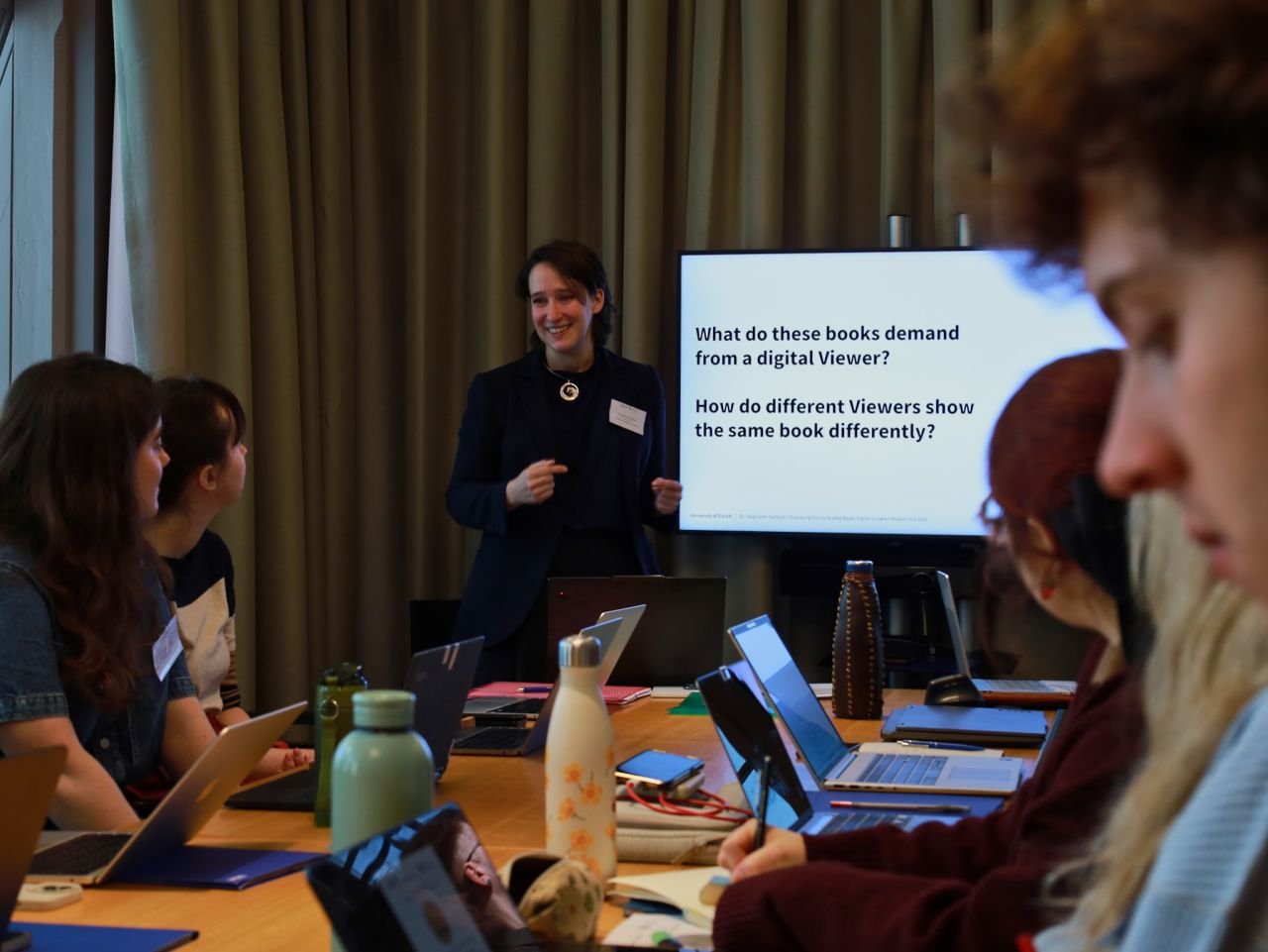
This module was first taught as the block seminar Displaying the Illustrated Book: Digital Curation Module, on 27, 29 and 30 October 2026 at the Chair of East Asian Art History, University of Zurich, for the inaugural cohort of the Ishibashi Foundation Graduate Programme. Stephanie Santschi taught it as Ishibashi Foundation Lecturer for Digital Curation. Each student worked on an illustrated book of their own choosing, several of them from the Museum Rietberg, and published a digital display of it.
The three sessions were understand the book and the viewer, build your display, and publish and present, closing with three-minute presentations in which each display carried the evidence for an argument about its book.
Case study: one book, five records
The worked example was Bonga hitori keiko 光悦正流 盆画独稽古 (first part, 1828), a manual of tray pictures (bonga) illustrated by Hokusai under the name Iitsu 為一. Five records describe it: the Museum Rietberg, the Smithsonian (National Museum of Asian Art), the National Institute of Japanese Literature (a microfilm of the Ueda City Library copy), the British Museum, and the Art Research Center, Ritsumeikan University, which publishes the British Museum copy. They disagree on the title, on whom they name, and on the date (1827 or 1828).
Their manifests disagree as well. Only the National Institute of Japanese Literature declares a right-to-left reading direction, and its viewingHint of individuals then makes viewers split every opening. None of the three manifests carries a licence: the one for the British Museum copy appears only on Japan Search and at image level. Each repository suited a different task: colour openings in one, the whole book in sequence in another, the fullest record in a third.
- Most errors come from missing information. Where the manifest says nothing, the viewer applies its default. To find the source of an error, check each layer in turn: the book, the images, the manifest, the viewer, your display.
- Look for a stated licence. A link to a terms page is not enough. If reuse is unconfirmed, link to the record instead of showing the image.
- The same book in three tools. Mirador showed two copies side by side, with the spoken argument in place of a caption; Storiiies walked a reader through one opening, detail by detail (example); StoryMapJS showed where the copies are held.
- Choose the tool to suit the argument. Before opening any tool, write down what the book is, which openings you will show, what the audience should understand, and what the material needs a tool to do.
What this cannot tell you
- The book itself. Weight, paper, the sound of a page, the size in the hand, the order in a box. A display represents the book, and looks more certain than the object.
- What digitisation discarded. A gutter photographed as two separate leaves cannot be rejoined by a viewer, and no setting brings back a foldout opened flat.
- Conditions the viewer's designers did not consider. Where a tool fails on this material, that is a finding about the tool. Report it.
- Whether the arrangement is fair. Sequence is argument. Only you can say what yours is arguing.
- Freedoms the tool was not built to give. Whether readers can leave your path, compare two copies, or read a note attached to a region depends on the tool's data model. Choosing the tool decides it.
Use your own materials
- Practise first on one of the eight test books, then move to your own.
- Rewrite the six conditions for your own book. Cut what does not apply and add what is missing. This list is the module's main result.
- Run step 1 against a manifest for your material and record what the two fields say.
- Place your candidate tools on the two axes, then fill in the six-condition table for the two that survive.
- Build a small exhibition of ten items and write the note in step 6 before you show anyone.
- Find a book's IIIF Manifest, and record where repositories disagree about it.
- State what a particular kind of book requires of a display tool, before choosing one.
- Read the fields in a manifest that govern reading direction and pairing, and recognise their absence as a finding.
- Place a display tool on two axes (who decides the order, and how the text meets the image) and say what each position costs.
- Hold a viewer against a list of conditions and report where it fails.
- Publish a small exhibition from a spreadsheet, and say in writing what the arrangement decided.
- Write a caption for a reader new to the book, and present a display in three minutes.
Draft, taught once: this is the material of the October 2026 workshop, and the six conditions above are the version worked out there. Comments through the repository issues or by email to [email protected].